

Opened the wrong way — this page has no styling and no images.
Image and stylesheet paths are resolved from the site root (/assets/…), so opening the file directly resolves them to C:\assets\… and nothing loads.
To see it properly: unzip 2_双击进后台改字_仅Windows.zip and double-click 启动后台.bat — the browser then shows the full site with styling, images and the ZH/EN switch.
(This zip is a plain static preview: opened directly it shows one page at a time, without styles, images or the language switch.)
Once uploaded it works normally: live traffic arrives over http, not by double-clicking a file.
This notice only appears when the file is opened locally; online visitors never see it.
ProductsWireless access & coverageSwitching & data centerOptical access & transportOptics & cabling
ServicesManaged NOCImplementation & deliverySpare parts & maintenanceAdvisory & architecture
SolutionsManaged network operations & NOCCampus & wireless coverageCloud-network branchesSecurity & compliance
Case studiesScale · managed operationsSpeed · bulk migrationContinuity · legacy retrofitTechnical notes
About usCompany profileCertificationsOffices & contactTechnical notes
Resources & contactTechnical notesFAQDelivery processPricingPrivacy & termsContact usOffice address
← Back to product family
Wireless access & coverage

Wireless bridge, point-to-point

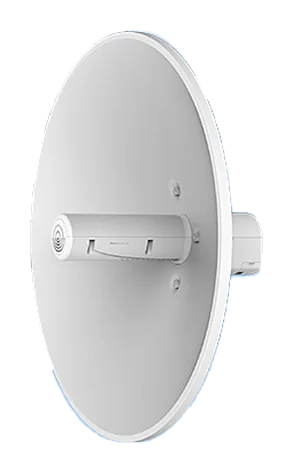
PH56BEH6-23X2

A 20 km-class industrial wireless bridge for links fiber cannot reach — between buildings, across campuses, over rivers. No cabling, and it comes up the same day.

Point-to-point backbone bridge PH56BEH6-23X2
20KM
Point-to-point range
10G wireless
Wi-Fi 7 backbone
Industrial-grade protection
Outdoor, long-term
No cabling
Fiber alternative

Where it fits: when you cannot dig between two buildings

No conduit between buildings, no easy trench across a river, a temporary site that needs a network — fiber there is slow and expensive. A wireless bridge is up the same day.

The backbone link is aimed with directional antennas, one unit at each end, configured as a bridge so it is transparent to the layers above.

How to choose and install: three things decide it

Range: 0.5 km (elevator shafts) / 16 km (6 GHz commercial) / 20–30 km (backbone). Keep 30% headroom over the real line-of-sight distance.

Bandwidth: 10G models for backbone links; gigabit is enough for access links.

Power and protection: outdoor units run on PoE — mind lightning grounding and pole mounting.

Specifications

Product typePoint-to-point / point-to-multipoint wireless bridge
Typical distance20 km class (the same family also offers 16 km / 30 km / 0.5 km elevator models)
BandsDual-band (2.4G + 5G); Wi-Fi 7 on backbone models
AntennaDirectional antennas, line-of-sight (LOS) installation required
DeploymentUsed in pairs; bridge mode is transparent to upper layers
PowerPoE powered; outdoor units need lightning grounding
NotesReal throughput varies with distance, weather and line-of-sight conditions; a site survey decides.

Need a datasheet or a quote? Tell us how you will use it.

Request datasheet →